55-Inch vs. 65-Inch TV Size Comparison
A 55-inch TV measures about 47.9 inches wide and 27.0 inches tall. A 65-inch model measures about 56.7 inches wide and 31.9 inches tall.
The “55” and “65” labels refer only to the diagonal measurement, corner to corner. They don’t describe the width. That’s why the real-world size jump feels bigger than the 10-inch gap between the model names suggests.
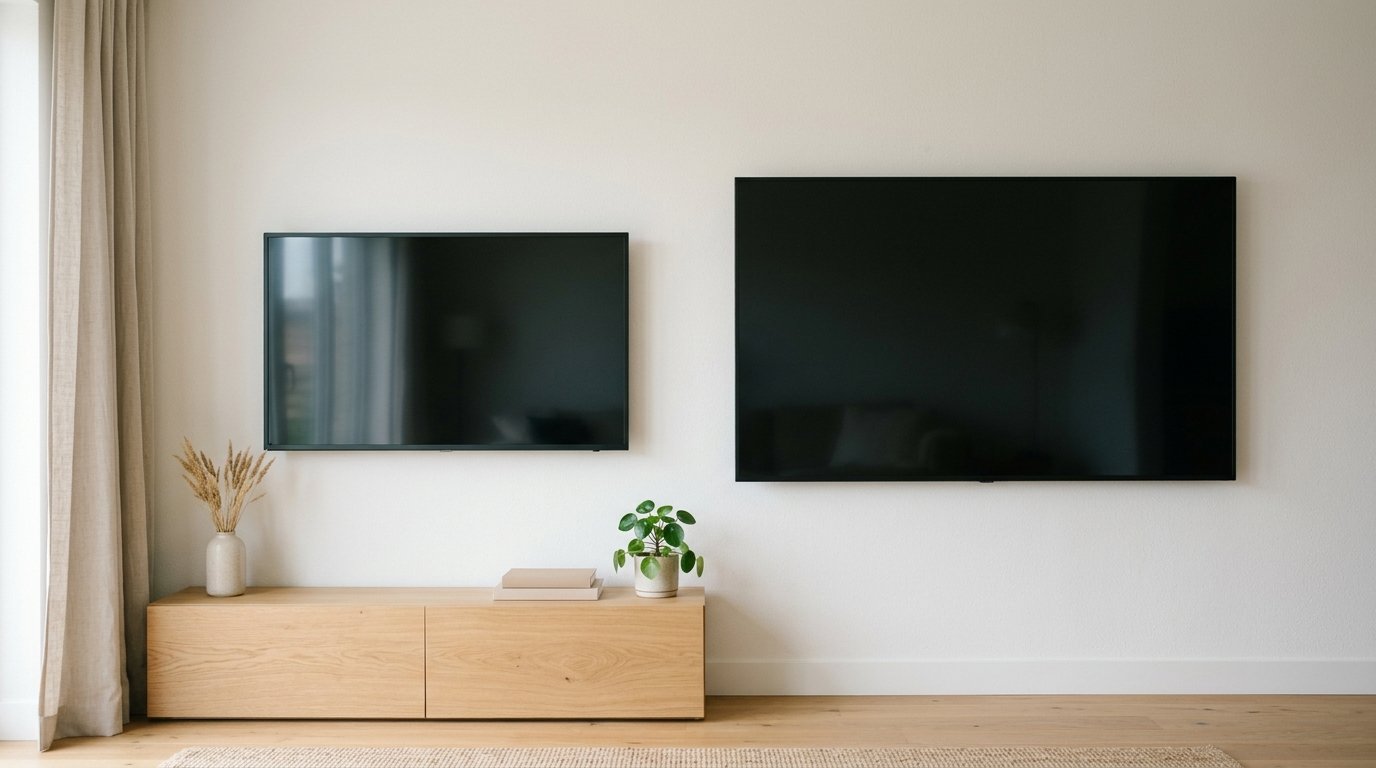
Side-by-side dimensions (standard 16:9 screens)
| 55″ TV | 65″ TV | Difference | |
|---|---|---|---|
| Diagonal | 55 in | 65 in | +10 in (+18%) |
| Width | ~47.9 in | ~56.7 in | +8.7 in |
| Height | ~27.0 in | ~31.9 in | +4.9 in |
| Screen area | ~1,293 sq in | ~1,806 sq in | +513 sq in (+40%) |
| Approx. weight (stand incl.) | 30-40 lbs | 45-60 lbs | +15-20 lbs |
Stepping up from a 55-inch screen to a 65-inch one adds about 40% more screen area. The diagonal grows only 18%. People find that gap surprising.
The reason is simple math. Area scales with both width and height at once, not with the single diagonal number printed on the box.
Why TVs are measured diagonally in the first place
Diagonal measurement became the industry standard because it’s the number least affected by aspect ratio changes. Screens moved from boxy 4:3 tube sets to modern 16:9 widescreens over the decades. Through that shift, the diagonal stayed a stable reference point, even as the relationship between width and height changed underneath it.
It’s a manufacturing and marketing convention. It’s not a figure anyone uses when arranging furniture or checking whether a set fits an entertainment center. For that, you need the width and height numbers above, not the diagonal.
How 55″ and 65″ fit into the wider size lineup
Most retailers stock TVs at these diagonal sizes. The width and height scale the same way across all of them, since they share the same 16:9 ratio.
| Size | Width | Height | Screen area |
|---|---|---|---|
| 43″ | ~37.5 in | ~21.1 in | ~791 sq in |
| 50″ | ~43.6 in | ~24.5 in | ~1,069 sq in |
| 55″ | ~47.9 in | ~27.0 in | ~1,293 sq in |
| 65″ | ~56.7 in | ~31.9 in | ~1,806 sq in |
| 75″ | ~65.4 in | ~36.8 in | ~2,405 sq in |
| 85″ | ~74.1 in | ~41.7 in | ~3,088 sq in |
| 98″ | ~85.4 in | ~48.1 in | ~4,106 sq in |
Notice the jump from 75″ to 85″: it adds 683 square inches, almost as much as an entire 55-inch screen covers on its own. Every step up the size ladder gets more dramatic than the diagonal number implies, because area grows with the square of the diagonal.
Resolution matters more on the bigger screen
Screen size interacts with resolution too. Pixel density — how tightly the picture’s pixels are packed — drops as the same resolution stretches across a larger panel. A 1080p (1920×1080) image on a 55-inch screen works out to about 40 pixels per inch.
Stretch that same 1080p signal across a 65-inch screen, and density falls to about 34 pixels per inch. That’s soft enough to notice at normal seating distances, especially on text.
A 4K (3840×2160) panel keeps density much higher at both sizes — about 80 PPI at 55 inches and 68 PPI at 65 inches. That’s a big part of why 4K resolution matters more, not less, as the screen grows.
A concrete case: if your source only streams in 1080p, a 55-inch set showing that feed will look noticeably sharper. A 65-inch set showing the identical feed will look softer.
What actually matters for choosing between them: viewing distance
Screen size should scale with how far you sit from it. It’s not just about the size of the room.
Here’s a commonly cited guideline for a comfortable picture, without visible pixels or lost detail:
- 43-inch: roughly 5.5-7 feet
- 50-inch: roughly 6-8 feet
- 55-inch: roughly 7-9 feet
- 65-inch: roughly 8-10.5 feet
- 75-inch: roughly 9.5-12 feet
- 85-inch: roughly 10.5-13.5 feet
Sit closer than the recommended range, and individual pixels and compression artifacts become more visible, especially on lower-resolution content. Sit farther away, and you waste the extra screen. From across a large room, a 65-inch and a 55-inch set start to look nearly the same.
Measuring your space before you buy
Two numbers matter beyond the screen itself. One is the stand’s footprint. The other is the wall-mount bracket pattern, known as VESA size.
A 65-inch set typically needs a stand or console at least 45-50 inches wide to sit stably. A 55-inch model needs roughly 38-42 inches.
Always check the manufacturer’s spec sheet rather than assuming a fixed ratio. Bezel width and stand design vary by model.
If you’re wall-mounting instead, confirm the wall space is at least as wide as the TV’s measured width. Leave a few extra inches of clearance on each side for cables and mount hardware.
Common mistakes when comparing TV sizes
- Assuming “10 inches bigger” means 10 inches wider. It doesn’t. The diagonal grows by 10 inches, but width grows by roughly 8.7 inches and height by about 4.9 inches.
- Measuring the box, not the screen. Retail packaging is always larger than the panel. Measure your space against the screen dimensions above, not the shipping box.
- Ignoring viewing distance entirely. A 65-inch TV crammed into a room where you sit 6 feet away will feel overwhelming rather than immersive.
- Comparing diagonal sizes across different aspect ratios. Ultrawide monitors and some projector screens use different ratios. The same diagonal number won’t produce the same width and height as a standard 16:9 TV.
Does picking 65 over 55 change anything besides size?
Size is the headline difference, but a few secondary factors move with it. Larger panels in the same product line often ship with better local-dimming zone counts and brighter peak HDR output. Makers tend to reserve their higher-end panel tech for the sizes people buy as a statement purchase.
Input lag and refresh rate specs are usually identical between the 55-inch and 65-inch version of the same model. Those depend on the processing chip and panel type, not the screen size.
So don’t assume the bigger set is automatically the better gaming display. Check the spec sheet for both sizes individually rather than assuming they match.
Frequently Asked Questions
How much wider is a 65-inch TV than a 55-inch?
About 8.7 inches wider: 56.7 inches versus 47.9 inches. It’s also roughly 4.9 inches taller.
Does a 65-inch TV need a bigger stand than a 55-inch?
Usually, yes. Check the manufacturer’s base-width spec directly, since stand footprints vary by model and aren’t a fixed ratio of screen size.
Is the diagonal-inch number the same across all TV brands for a given size?
Yes, for standard 16:9 screens. A 55-inch TV from any major brand has essentially the same width and height. The diagonal-to-width-and-height relationship is fixed by the aspect ratio, not the manufacturer.
How much more screen area do you actually get going from 55 to 65 inches?
About 513 more square inches. That’s a 40% increase in viewing area for an 18% increase in diagonal size.
Is a 65-inch TV too big for a small bedroom?
It can be, if your seating distance is under about 8 feet. Use the viewing-distance guideline above. If your bed or chair sits closer than roughly 8 feet from the screen, a 55-inch or even 50-inch panel will likely look more proportional.
Do 55-inch and 65-inch TVs cost roughly the same per inch?
Not usually. Larger panels typically cost more per diagonal inch than smaller ones in the same line. Manufacturing costs rise faster than size, due to lower yields on bigger glass. Comparing price per square inch of screen, rather than price per diagonal inch, gives a fairer read on value.